Self-hosted email server on a VPS: port 25, PTR and DKIM
Published 12 Nov 2026
Self-hosted email server on a VPS: which hosts open port 25 and let you set PTR, how to publish SPF, DKIM and DMARC, and when a rented mailbox is wiser.
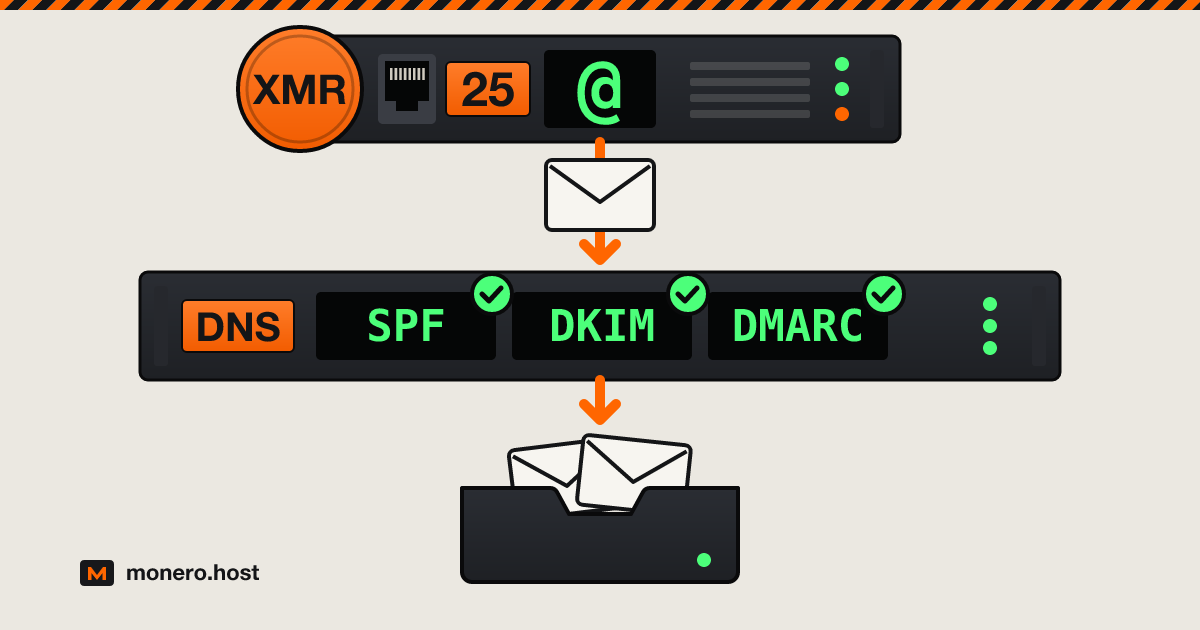
A self-hosted email server still works in 2026: a small VPS, a clean static IP, a handful of DNS records and a host that lets mail leave on port 25. What changed is the margin for error. Gmail, Yahoo and Outlook junk or refuse mail from servers without reverse DNS and authentication, and most VPS hosts block outbound SMTP until you ask. Below: which hosts in our rack open port 25 and on what terms, which software to install, the records to publish, and when renting a mailbox is the better call.
Checked on 1 October 2026.
What self-hosting email gets you, and what it costs
What you get:
- Your mail on a disk you control, under a domain you own. Changing hosts means moving an MX record, not changing your address.
- No mailbox provider in the middle: no phone number to hand over, and nobody else holding the mail you receive.
- As many domains, aliases and mailboxes as the disk holds.
What it costs:
- Your time. A few hours to set up, then updates and backups. Senders retry for days when your server is down, so a short outage is fine. A dead disk without a backup is not.
- Deliverability is on you. When Gmail junks your mail or a blocklist adds your IP, there is no support desk to escalate to: you find the cause and fix it.
- Privacy covers one end only. A message you send to a Gmail user is stored at Google like any other.
What a self-hosted email server needs
- A static public IP. Blocklists judge the IP your mail leaves from. Home connections rarely qualify (see the FAQ).
- Outbound TCP port 25. Your mail client uses 587 or 465, but server-to-server delivery happens on 25 and nothing else.
- A PTR record you can set, pointing the IP back to your mail hostname, which must resolve to the same IP.
- A clean IP in a clean range, covered next.
- A domain whose DNS you control.
- KVM and enough RAM. The five projects below ask for anywhere from about 100 MB idle (Stalwart) to 6 GiB plus swap (mailcow), and mailcow does not run on OpenVZ or LXC.
Before you pick a host: IP reputation, Spamhaus and UCEPROTECT
Most receiving servers look up the connecting IP in DNS blocklists before they read a word of the message. Three matter most when you choose a host:
- Spamhaus PBL lists end-user ranges that should never deliver straight to other mail servers, added by the networks themselves and by Spamhaus. It is policy, not an accusation: a static IP with matching forward and reverse DNS that runs a real mail server can be removed through the Spamhaus reputation checker.
- Spamhaus SBL lists actual spam sources and the services that support them, bulletproof hosting included. Only the network provider can ask for removal, and Spamhaus never charges for it.
- UCEPROTECT works in three levels. Level 1 lists single IPs, mostly ones that hit its spam traps, and an IP with missing or generic reverse DNS is the most likely to be listed after a single incident. Level 2 lists the whole allocation around them when too many Level 1 entries pile up within seven days. Level 3 lists every IP of a network (ASN) whose score crosses its threshold, and its own policy page warns that this will hit innocent users. Level 1 entries expire after seven days without new abuse.
Levels 2 and 3 are why the host matters more than the price: on a network that tolerates spammers, you inherit their reputation. This is where offshore hosting needs a second look, because a network that shrugs off every complaint can shrug off spam reports too. For mail you want a host that keeps spammers off its network and says so in writing. rdp.monster writes that it blackholes any IP Spamhaus lists, Kyun's acceptable use policy bans anything that gets an IP listed on Spamhaus, and SuperBitHost passes an upstream delisting fee, currently EUR 99 per incident, on to the customer.
Look up your new IP at check.spamhaus.org and on the UCEPROTECT site before configuring anything, and pay for a single month until the first test mails have landed.
Port 25 and reverse DNS at the VPS hosts in our rack
Open means the host's own text says port 25 is not blocked or SMTP is permitted. On request means a ticket or a paid option, sometimes with conditions. Never means the host says no and documents no exception. Only hosts that state their policy on their own site are listed; the others are left out rather than guessed. None publishes a numeric sending limit for a VPS. Checked on 1 October 2026, alphabetical.
| Host | Outbound port 25 | Reverse DNS (PTR) | Conditions | Where it is written |
|---|---|---|---|---|
| BTCVPS | Never | Not stated | Mail ports blocked, cannot be enabled on any plan | Home page FAQ |
| Cloudzy | On request | Not stated | 25, 465, 587 and 2525 blocked by default; approval not guaranteed | Knowledge base (updated 26 Feb 2026) |
| FlokiNET | On request | Set by support on the same ticket | SPF, DKIM and DMARC first; EUR 150 deposit on orders under six months old, returned as credit after six months | Knowledge base: PTR and e-mail policy |
| IncogNET | On request | Not stated | Case by case, one-time $5 fee | KVM VPS page |
| Kyun | Open | Self-service in the dashboard | No ports blocked | Danbo FAQ |
| Mynymbox | On request | Must be in place before the request | 25, 465 and 587; EUR 10 non-refundable fee; SPF, DKIM and DMARC set; abuse reports answered within 24 hours | Docs: port 25 policy |
| Njalla | Never | Not stated | Outgoing SMTP blocked; they suggest SMTP services instead | Servers page FAQ |
| rdp.monster | On request | Self-service in the client area | Paid option chosen during the order, $5 a month | Linux VPS page |
| Servers Guru | On request | Not stated | 25, 465 and 587; case by case | FAQ |
| SporeStack | On request | Default hostedonsporestack.com name; custom PTR not stated | 25 and 465 blocked on new servers; lifted in some cases | FAQ |
| SuperBitHost | Open | Not stated | Primary and secondary IPs only, blocked on additional IPs | Terms, section 11 (3 Aug 2026) |
Kyun is the only host here that leaves port 25 open and lets you set the PTR yourself from day one. FlokiNET documents the whole path: publish SPF, DKIM and DMARC, open a ticket titled with your server's IP, and staff lift the block and create the PTR together. Where the PTR column says not stated, ask support before you pay: without a matching PTR you fail Gmail's first rule for every sender. More hosts, with their Monero and KYC details, are in the VPS bay.
Pick the software: Mail-in-a-Box, mailcow, docker-mailserver, Stalwart, Mox
Five projects cover most setups. Figures are each project's own.
| Software | What it is | RAM | Licence |
|---|---|---|---|
| Mail-in-a-Box | Appliance: Postfix, Dovecot, Roundcube, Nextcloud contacts and calendar, own DNS server | 512 MB minimum, 1 GB recommended | CC0 |
| mailcow | Docker stack: Postfix, Dovecot, Rspamd, ClamAV, SOGo webmail and groupware | 6 GiB plus 1 GiB swap minimum | GPL-3.0 |
| docker-mailserver | One container driven by configuration files and a setup script, no SQL database | 512 MB minimum (ClamAV off), 2 GB recommended | MIT |
| Stalwart | Single Rust binary: SMTP, IMAP, JMAP, POP3, CalDAV, CardDAV, WebDAV | About 100 MB idle, 1 GB for 5 to 10 users | AGPL-3.0 or a commercial licence |
| Mox | Single Go binary; the quickstart prints the DNS records and checks blocklists | 512 MB to start | MIT |
- Mail-in-a-Box installs only on a fresh Ubuntu 22.04 server that you then leave alone. Version 77 came out on 26 September 2026, but standard security maintenance for 22.04 ends in May 2027, so watch for the move to a newer release.
- mailcow is the most complete and the hungriest.
- Stalwart and Mox are the lightest. For one or two people on a 1 GB VPS, either is the shortest path to a working server.
The DNS records: MX, SPF, DKIM, DMARC and PTR
With mail.example.com on 203.0.113.25, the zone looks like this:
example.com.                   MX    10 mail.example.com.
mail.example.com.              A     203.0.113.25
example.com.                   TXT   "v=spf1 mx -all"
mail._domainkey.example.com.   TXT   "v=DKIM1; k=rsa; p=MIIBIjANBgkqh..."
_dmarc.example.com.            TXT   "v=DMARC1; p=none; rua=mailto:[email protected]"
- MX tells the world which host receives mail for the domain.
- SPF (RFC 7208) lists the servers allowed to send for it.
mx -allmeans: only my MX hosts, and mail from anywhere else fails. - DKIM (RFC 6376) publishes the public key your server signs with. The selector (
mailabove) and the key come from your software; paste them exactly. - DMARC tells receivers what to do when a message passes neither SPF nor DKIM for the domain in its From line, and where to send reports. RFC 9989 replaced RFC 7489 as its specification in May 2026. Start with
p=none, read the reports for a few weeks, then move top=quarantineorp=reject. - PTR is not in your zone at all. It lives in the reverse zone of whoever owns the IP, so you set it in the host's panel or through a ticket, never at your registrar.
Check the records, then confirm from the server itself that port 25 is open:
dig +short MX example.com
dig +short TXT example.com
dig +short TXT mail._domainkey.example.com
dig +short TXT _dmarc.example.com
dig +short -x 203.0.113.25
nc -vz -w 5 gmail-smtp-in.l.google.com 25
The reverse lookup must return mail.example.com. and nc must report a successful connection; a timeout usually means the port is still blocked.
Getting into Gmail and Outlook inboxes
The rules are public, and they apply to personal servers too:
- Gmail, for every sender since February 2024: SPF or DKIM, a PTR whose hostname resolves back to the sending IP, TLS, and a spam rate under 0.3%. Above roughly 5,000 messages a day to Gmail addresses, you also need SPF and DKIM and DMARC aligned with the From domain, plus one-click unsubscribe on marketing mail. Since November 2025 Gmail has been tightening enforcement with temporary and permanent rejections.
- Yahoo asks every sender for the same basics: SPF or DKIM, valid forward and reverse DNS, spam under 0.3%.
- Outlook.com has required SPF, DKIM and DMARC since 5 May 2025 from domains sending over 5,000 messages a day; failures go to junk and may be rejected with
550 5.7.515. Its postmaster policy adds that connections from dynamic IP space may be refused and every mail server needs valid reverse DNS.
A personal server will never reach 5,000 a day, but publish all three records anyway: they cost nothing. Then warm up. A new domain and a new IP have no history, so start with real conversations, not a newsletter. Send a test to a Gmail address and open Show original: SPF, DKIM and DMARC should all read PASS.
Privacy notes: logs, disk encryption, the domain's registration
- Headers. Your mail client's IP can land in the first
Received:line of everything you send. Mail-in-a-Box rewrites that line and dropsUser-Agent,X-MailerandX-Originating-IPon outgoing mail. On a hand-built Postfix, a dedicated cleanup service on the submission ports does the same (it needs thepostfix-pcrepackage, thenpostfix reload):
# /etc/postfix/master.cf: add this line under the submission (587)
# and submissions (465) services (older files name 465 smtps)
  -o cleanup_service_name=authclean

# then add a new service at the end of master.cf
authclean unix n - - - 0 cleanup
  -o header_checks=pcre:/etc/postfix/submission_header_checks
  -o nested_header_checks=

# /etc/postfix/submission_header_checks
/^\s*Received:[^\n]*(.*)/  REPLACE Received: from authenticated-user (mail.example.com [203.0.113.25])$1
/^\s*User-Agent:/          IGNORE
/^\s*X-Mailer:/            IGNORE
/^\s*X-Originating-IP:/    IGNORE
- Logs. Postfix logs sender, recipient and connecting IP for every message, and Dovecot logs every login with the client's IP. Pick the retention yourself (logrotate for
mail.log,MaxRetentionSec=injournald.conf). - Disk encryption. Full-disk encryption protects snapshots and retired drives, not a running VM from the company hosting it, since the key sits in memory. Stalwart can also encrypt each incoming message with the user's OpenPGP key or S/MIME certificate before writing it to disk, so only the holder of the private key can read it.
- The domain. Your address is only as private as the domain's registration record. Our guide to anonymous domain registration covers WHOIS, and the domains bay lists registrars that take Monero.
- DNS. With Mail-in-a-Box's built-in nameserver, a secondary elsewhere keeps your records answering when the box is down. 1984 Hosting's free anycast DNS handles DNSSEC automatically and can also act as secondary for a master you run; more in the DNS bay.
- Payment. Paying the host in Monero keeps your bank and card out of its billing records. What the signup form asks for decides the rest.
When to rent a mailbox instead
Self-hosting is the wrong tool when:
- Other people depend on it and you cannot be on call.
- You mostly send in bulk. Newsletters belong on a sending service, not on your personal server's reputation.
- You want privacy, not control. An encrypted mailbox paid without your name needs no maintenance. See email without a phone number and the email bay.
- Your host never opens port 25. You can still receive on your own server and send through an authenticated relay on port 587, which is what Njalla suggests.
FAQ
Is it worth hosting your own email server?
Yes, if you want your mail on a server you control and will spend an hour a month on updates, backups and blocklist checks. No, if other people depend on it and you cannot be on call, or if you mostly send in bulk. Deliverability is manageable: Gmail and Outlook publish their rules, and a clean IP with PTR, SPF, DKIM and DMARC covers the technical part of them.
Is it possible to self host an email server?
Yes. The hard requirements are a static IP, outbound port 25, a PTR record you control and a domain whose DNS you manage. Most VPS hosts block port 25 at first, so check the host's policy before ordering: in the table above, Kyun and SuperBitHost leave it open, while FlokiNET and Mynymbox open it after a documented request.
What is the best self-hosted email server for home use?
Put it on a small VPS rather than your home line: home IPs are usually dynamic, often sit in Spamhaus's PBL, and Outlook.com may refuse connections from dynamic ranges. For one or two people, Mox or Stalwart runs in under 1 GB of RAM. Mail-in-a-Box is the most hands-off, and mailcow suits a household that wants SOGo groupware and has 6 GiB of RAM to spare.
The short version
A KVM VPS from a host that documents its port 25 policy, a PTR you can set, an IP clean on Spamhaus and UCEPROTECT, one of five mature projects, the records above and a few weeks of warm-up. Pay in Monero, trim the headers and logs, keep a backup elsewhere. If that reads like a chore rather than a project, rent the mailbox.